


Welcome to your Showcase Manual
Please find below the information you will need to plan your showcase at the World Congress of Nephrology.
What is the industry portal?
The industry portal is an important tool in your WCN’21 planning. You can do the following:
- Upload your showcase content
- View your registrations, buy extra and provide names
- View invoices and confirmations
- Submit industry symposia programs
How do I access the industry portal?
Access the industry portal here
Log-ins will be sent to you in January 2021. You will need to set your password on the first time you log in.
I have not received my log-in
Please contact Charleigh Claire at [email protected] to receive your log-in.
A series of webinars have been organized for our industry partners to ask their questions live to the team.
The webinars will take audiences through various elements of exhibition and industry symposia set-up. The topics for each webinar are listed below.
Webinars have been arranged at varying times to accommodate for different time zones. All webinars will be recorded and posted here shortly after.
Webinar #1
Exhibition
February 24, 2021 at 16:00 CET
Congress schedule
How to build your online booth
Mock-up of main platform pages
Networking
Registrations
Webinar #2
Exhibition
March 10, 2021 at 09:00 CET
Session structures
Booth building recap
Registrations
Demo of Tawk live chat
Upcoming deadlines
Webinar #3
Industry Symposia
March 12, 2021 at 15:00 CET
Pre-recording
Polling
Live Q&A
Open access for symposia sessions
Visuals
Important dates
31 January 2021
1 February 2021
12 February 2021
12 February 2021
24 February 16:00 CET
25 February 2021
10 March 2021 09:00 CET
15 March 2021
15 March 2021
15 March 2021
15 March 2021
17 March 2021
29 March 2021
2 April 2021
9 April 2021
16 April 2021 08:00 CET
31 May 2021
Showcase manual released
Deadline to submit artwork for February edition of e-newsletter (See Advertising tab)
Deadline to book Industry Showcase
Deadline to submit suggested topic for Topical Networking Room (See Advertising tab)
Webinar Q&A for exhibitors
Deadline to submit artwork for March edition of e-newsletter (See Advertising tab)
Webinar Q&A for exhibitors
Deadline to submit artwork for Entrance Area on Event Platform (See Advertising tab)
Deadline to request slot & platform of Social Media Post (See Advertising tab)
Deadline to submit Delegate Bag Insert content (See Advertising tab)
Deadline to submit Feature Article content (See Advertising tab)
Deadline to submit artwork for Onsite E-Newsletter daily editions (See Advertising tab)
Deadline to submit artwork for April edition of e-newsletter (See Advertising tab)
Deadline to provide names of complimentary registrations
Recommend to have showcase space finalized for final checks
Industry showcase opens
Industry showcase closes
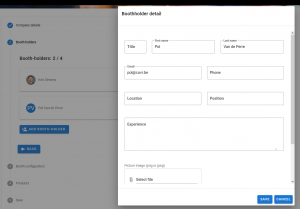
NEW Better display for booth contacts
As you know, the current set-up for your Industry Showcase allows exhibitors to add a number of contacts for display (inputted in the Company Description field during booth building).
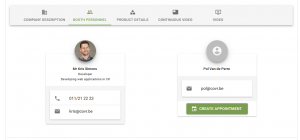
Now there is an opportunity to display your contacts in a better view. Plus, optional “schedule meeting” functionality.
There is no extra fee for this. We just ask for you to confirm email your interest by email (before Monday 29 March 2021) and we will turn this on for you.
Benefits:
- Display your booth contacts in a better view
- Allow delegates to set meetings with your booth contacts (Optional)
Back-end
How it displays on your booth
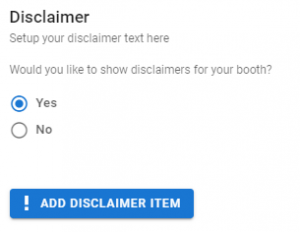
NEW Possibility to add disclaimers
During booth set-up, there is now a field to turn on a disclaimer message that will pop-up as delegates enter the virtual booth. You can customize this message.
NEW Can we receive the URL of our booth to plan promotion?
Yes – on April 12, 2021 you will receive the direct URL for your booth access that you can use in your own promotion ONLY as from when the exhibition officially opens on April 15, 2021.
Please note if you are using the microsite option, you must include the booth URL in any promotional material rather than the microsite URL. This is to keep accessibility for registered delegates and the organizer to be able to provide metrics.
Where do I go to upload my content?
To edit your showcase, access your industry portal and click on the Industry Showcase button.
Is there a deadline to submit my content?
We recommend having your showcase finalized by 9 April 2021. Please note you will still be able to make changes to your showcase at any time the platform is live from 16 April – 31 May.
Previewing my showcase
You will be able to preview how your showcase looks at the end of the upload process. You can preview any changes you make immediately. If you do not see your changes, please refresh the page.
What can I upload?
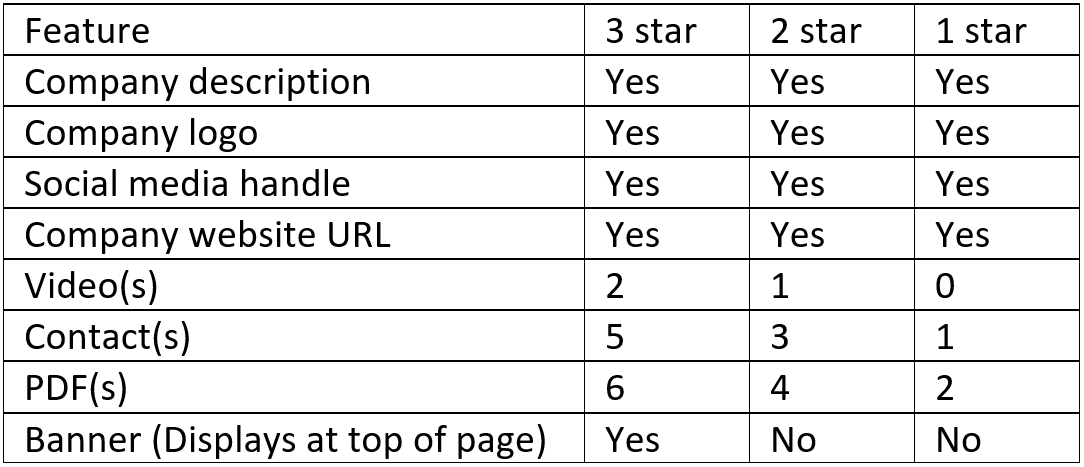
Your showcase tier (1, 2 or 3 star) decides which content (and quantity of) that you can upload. The table below outlines this.
What are the specifications for content?
Company description
Max 1000 characters allowed for your company description. Links and formatting can be included. However unnecessary html encoding is removed after final edit.
Include here:
- Social media handles
- Contact(s)
Company logo
Two versions of your company logo are required:
- 960 x 540 pixels (Main logo)
- 160 x 90 pixels (Used a thumbnail where needed)
It is important that your images stick to these proportions. To have bigger sizes is not a problem but the width and height ratio must be respected (190×90 -> 380x 80 etc.
Company website URL
There are no max characters. It is advised to use a URL shortener.
Video(s)
We recommend that the maximum size of your video is 4GB. Use an MP4 movie format.
Please note that transcoding takes time and your video may not be immediately visible in the preview. If so, it will become available when reloading the configuration later.
Main contact
There is a button on your showcase for delegates to leave a message. The messages are sent to this contact. The fields are:
- First name
- Surname
- Email address
PDF(s)
To open a PDF, delegates will click on a button. You can design a different image for this button (e.g. Click here to view product XYZ).
Image for button: The image should be in png or jpeg format. The specifications are 750w x 1000h.
PDF: We recommend that the size of your PDF is between 2GB – 4GB.
Please note – when naming the PDFs, you must use different names for each one otherwise they will not show.
Banner
The banner displays at the top of your showcase. The specifications are 750w x 290h. This only applies to the 3-star showcase spaces.
Showcase colours (3D booth only)
You can customize your 3D showcase render with different colours. You will need the HEX number of the colours e.g #FF0000
Booth colour: To edit the colour of your stand
Accent colour 1: To edit the colour of chairs/stools in your stand
Accent colour 2: To edit the colour of the desk in your stand
Live chat
You can activate the live chat function on your showcase. This allows delegates and exhibitors to chat on the booth directly.
You may choose between the following:
- Not activated
- Tawk
- Livechat
- Clickdesk
- Helpcrunch
You should make an account to use. We recommend using Tawk as there is a free subscription available.
How can delegates access the booth?
Delegates will enter WCN’21 and click on the button Showcase. This will take them to the showcase lobby area where they can enter your showcase.
How long will my showcase be available to view by WCN attendees?
Industry showcase is open from 16 April – 31 May 2021.
Example of each showcase tier
Editing access to your showcase by health care professional status
Each exhibitor will decide if their showcase is accessible by non / health care professionals during the upload form at the following prompt:
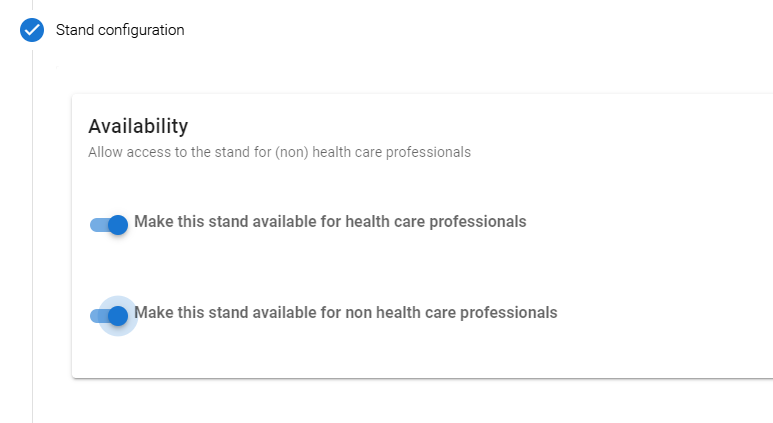
When delegates access WCN for the first time, they will be asked if they are a prescribing health care professional.
Editing access to showcase content per country of delegate
You can choose to restrict who can view the PDFs uploaded to your booth by country of delegate.
When you upload your PDF on the form, there is an option to choose countries that should not be able to view certain content.
Once activated, the delegate from the restricted-country will still be allowed access to your showcase (and view your company description, logo etc.). However, the restricted content (PDF) product picture will be blurred and no click-action will be available to open the PDF.
How do I set up my 3D booth? (3-star only)
The form is automatically set for a non-3D booth. You must request that you would like a 3D booth and organizers will update the system for you.
Then you will upload your content as usual and this will be positioned in the correct location on your 3D booth.
For a 3D booth, you will have an extra field to decide the colors to customize your 3D showcase render.
How do I set up my microsite? (3-star only)
Please only insert the URL of your micro-site into the Company Description field. Technicians will create a button on your booth directing visitors there.
Full-congress registrations
Companies may receive a number of complimentary full-congress registrations depending on your booking:
Platinum supporter: 3 full congress included
Gold supporter: 2 full congress included
Showcase (3-star): 2 full congress included
Showcase (2-star): 1 full congress included
Full-congress registrations allow access to all areas of WCN’21. These registrations will be ready in your industry portal for you to allocate names to before 2 April 2021. Any name changes received after the deadline are subject to a fee. These registrations are intended for use only by the company.
Showcase access
Showcase registration only allows access to the Industry Showcase and Networking page. You will not be able to access the scientific program, posters, pre-congress courses or any other areas of WCN’21.
All showcasing companies are able to add an unlimited amount of showcase access for their staff. The purpose of these is for exhibitors to staff your showcase and network. You can add any amount of complimentary showcase access in the portal – See below for instructions.
How to order extra registrations
- Go to portal and click on button: Add registrations to my group
- The form will ask you to confirm your details and then click Next (bottom right)
- Select the type of badge you need and confirm the amount needed. Click Next.
- If you have selected a registration with a fee, complete the Payment
How to provide names for registrations
Go to portal and click on button: Complete badge names for my group
The deadline to assign names is 2 April 2021. Please note registrations may only show once payment steps are completed.
How can I reach out to delegates?
Industry may interact with delegates via the Networking page. You can find the full list of delegates listed on this page. You can talk via chat, group chat or video. WCN organizers are encouraging delegates to complete their profile and add extra information as much as possible.
Live chat
Exhibitors with 2-star booths or above: You can activate the live chat function on your showcase. This allows delegates and exhibitors to chat on the booth directly. The chat will pop-up on the bottom corner of the screen. You do not need to be logged in to WCN to use the live chat function as it is an external technology.
Are there are any restrictions?
You must adhere to the code of conduct.
The information delegates have uploaded to their WCN profile for Networking is only for use within WCN environment. It is not allowed to save any personal data taken from profiles during the congress without prior permission of that individual, for the purpose of contacting them outside of WCN.
Can I view the showcase on different devices?
All layouts will adapt to the screen size of the device. Please note that 3D booth renderings are not supported on iOS devices and will not show.
Can I log into WCN on different devices?
Yes, you can log in on multiple devices.
Are there are restrictions?
Please note that 3D booth renderings are not supported on iOS devices and will not show.
What data will we receive about WCN’21?
All exhibitors will receive a WCN’21 statistics report after the congress with information such as: total number of delegates, % breakdown of interests and practice settings, country and region data, and abstract statistics. This information is general and will not identify any delegate individually.
What data will we receive about our showcase?
Exhibitors will receive an export of their booth metrics. It will show the unique amount of visits and the total amount of visits to your booth. If the participant has agreed to share their data, the report will contain their registration information including: date of visit, first name, surname, gender, email, affiliation and country. It may also contain: area of activity, professional interest, practice setting (to be confirmed). This data will identify delegate(s) individually and is only shared upon their consent. When delegates log-in to WCN for the first time, they will be prompted to update their profile and set the following preferences:
- Please do (not) share my details with organizers of symposia sessions I attend
- Please do (not) share my details with booths I visit in the Industry Showcase
If the delegate does not give consent to share their registration details, the line in the report will not include any of the abovementioned data.
Will we receive data about other exhibitors?
Exhibitors will only receive information pertaining to their own booth. They will not receive a comparison report to other exhibitors.
When will we receive metrics?
2-star and above: Exhibitors will receive a report daily with raw data (end of day CET time). At the end of WCN, exhibitors will receive a cleaned-up version with data graphs.
1-star and above: At the end of WCN, exhibitors will receive a cleaned-up export with data graphs.
What is included in the promo pack?
- Congress banners
- Congress presentation slide
- VWCN logo in various formats
- Social media image templates
- Suggested text for your social media posts
- Official VWCN hashtags
You will find here information for the different advertising opportunities at WCN’21. Please contact Charleigh Claire at [email protected] for more details or to complete a booking form.
Pre-Congress E-Newsletter
Fee: $2,000 – $3,000
Specifications: 190 x 600px You may include a URL No specific product advertising allowed. GIF/animated images are not recommended as can affect quality. 72 DPI is optimal for all web artwork.
Deadline to submit artwork for each issue:
Feb edition: 5 February 2021
March edition: 25 February 2021
April edition: 29 March 2021
Submit via email to [email protected]
Please note the template is subject to change slightly depending on content. There are two ad spaces available per newsletter of equal size.
Onsite Congress E-Newsletter
Fee: $2,000 – $3,000
Specifications: 190 x 600px You may include a URL No specific product advertising allowed. GIF/animated images are not recommended as can affect quality. 72 DPI is optimal for all web artwork.
Deadline to submit artwork for each issue: 17 March 2021 for all editions (Thurs – Mon)
Submit via email to [email protected]
Please note the template is subject to change slightly depending on content. There are two ad spaces available per newsletter of equal size.
Entrance Area on Event Platform
Fee: $7,000
Specifications: 180 x 300px No specific product advertising allowed. GIF/animated images are not recommended as can affect quality. 72 DPI is optimal for all web artwork.
Deadline to submit artwork: 1 March 2021
Please note the example is subject to final changes.
About Page on WCN Website
Fee: $5,000
Specifications: 300 x 300px No specific product advertising allowed. GIF/animated images are not recommended as can affect quality. 72 DPI is optimal for all web artwork.
Deadline to submit artwork: No deadline. Artwork will be uploaded as soon as provided by sponsor.
Home Page on WCN Website
Fee: $7,000
Specifications: 728 x 90px No specific product advertising allowed. GIF/animated images are not recommended as can affect quality. 72 DPI is optimal for all web artwork.
Deadline to submit artwork: No deadline. Artwork will be uploaded as soon as provided by sponsor.
Registration Pages on WCN Website – NEW
Fee: $6,000
Specifications: 300 x 300px No specific product advertising allowed. GIF/animated images are not recommended as can affect quality. 72 DPI is optimal for all web artwork.
Deadline to submit artwork: No deadline. Artwork will be uploaded as soon as provided by sponsor.
Link: https://www.theisn.org/wcn/registration-practicalities/
Industry Pages on WCN Website – NEW
Fee: $6,000
Specifications: 300 x 300px No specific product advertising allowed. GIF/animated images are not recommended as can affect quality. 72 DPI is optimal for all web artwork.
Deadline to submit artwork: No deadline. Artwork will be uploaded as soon as provided by sponsor.
Push Notification
Fee: $6,000
Specifications: 400 max characters + emojis (from standard emoji keyboard) No URL or images. Only text. No specific product advertising allowed.
Deadline to submit: Please submit your preferred time/date and notification text by email to [email protected] by 15 March 2021. Schedule will be allocated by first come, first serve.
Please note there is a maximum of 5 notifications allowed per day.
Social Media Post
Promote your symposium on any one of the ISN’s popular and growing social media networks. The ISN will post your content on any one of our social media accounts below:
Facebook: 28k+ fans https://www.facebook.com/ISNkidneycare
Twitter: 9.6k+ followers https://twitter.com/ISNkidneycare
LinkedIn: 6.3k+ followers https://www.linkedin.com/company/isnkidneycare/
Instagram: 540+ followers https://www.instagram.com/isnkidneycare/
Fee: $6,000
Deadline to submit: Please requested your preferred time/date and social media platform to [email protected] by 15 March 2021. This will be approved by our ISN Social Media Manager. You will need to submit your content no later than two weeks prior the communication is planned to go out.
Schedule will be allocated by first come, first serve. No specific product advertising allowed.
GIF/animated images are not recommended as can affect quality. 72 DPI is optimal for all web artwork.
Delegate Bag Insert – NEW
Participants will be sent their delegate bags by email before WCN. They can also collect their virtual delegate bag during WCN from the Maple Leaf Plaza – a central Canadian-themed room. The bag will contain promotion of WCN program/activities plus adverts from industry participants with a button to download a PDF leaflet.
Fee: $1,000
Deadline to submit: 15 March 2021 to [email protected]
Specifications:
Image: 500px x 500px GIF/animated images are not recommended as can affect quality. 72 DPI is optimal for all web artwork.
Title: Max 25 characters
Subtitle: Max 40 characters
Intro text: Max 600 characters
Download link: PDF of any size
Feature Article – NEW
Submit an feature article on your symposium or information about breaking research, advances in healthcare, patient care and more, for release in the April 2021 edition of the WCN E-Newsletter.
Fee: $2,000
Deadline to submit: 15 March 2021 to [email protected]
Specifications: Max 900 character text article – You may submit a video link with your text. No specific product advertising allowed.
Topical Networking Room
Topical networking rooms will facilitate interaction for participants. Networking rooms may have open access for all or be restricted for certain groups (grant recipient room, speaker networking room, etc). Within each room, participants can use the chat functionality or engage in direct video calls.
Fee: $5,000
Deadline to submit: You may suggest a topic for your sponsored room. Please submit topic suggestion by 12 February 2021.
Specifications: Coming soon No specific product advertising allowed.
Charleigh Claire
ISN Business Development Manager
[email protected]
Paolo Zavalloni
ISN Events Project Manager
[email protected]
Alexandra Kelley
ISN Business Development Administrator
[email protected]